
FedEx knows what you ran. Motive knows where the truck went. WEX knows what fuel you bought. Linehaul Command Center brings it together — settlements, payroll, IFTA and truck service, built from data you already have.
Screens below, no form required. The hands-on demo takes about a minute to request.

Most linehaul contractors run the business across a settlement workbook, a payroll sheet, an IFTA file somebody built years ago, and a driver roster nobody checks until a driver is already out of compliance.
Generic fleet software doesn't fix this, because generic fleet software has never seen a FedEx settlement statement. It doesn't know what a run is, what availability percentage means, or why declines matter.
Every feature here exists because a contractor needed it on a specific Tuesday — not because it tested well.
Import your settlements and every leg is reconciled against the runs you actually covered. The system flags broken tour chains, legs that never returned to a base hub, and mileage that doesn't match the lane's history.
You get a specific, defensible list to take back to FedEx — not a suspicion that something's off.
Trucks float between your entities and drivers cover whichever run needs covering. Miles and pay are charged to the company that owns the run — not whichever truck happened to be free.
When a truck crosses companies, the week shows you exactly which legs moved and where they were charged.
Rate changes are effective-dated. Change a rate or move somebody from trainee to driver and payroll you already submitted stays exactly as submitted.
Every change is dated and reviewable — so when someone asks why a number is what it is, the answer is in the system.
Four screens from the working software. These are real views running on sample data for two invented companies — not mockups, and not anyone's real numbers.
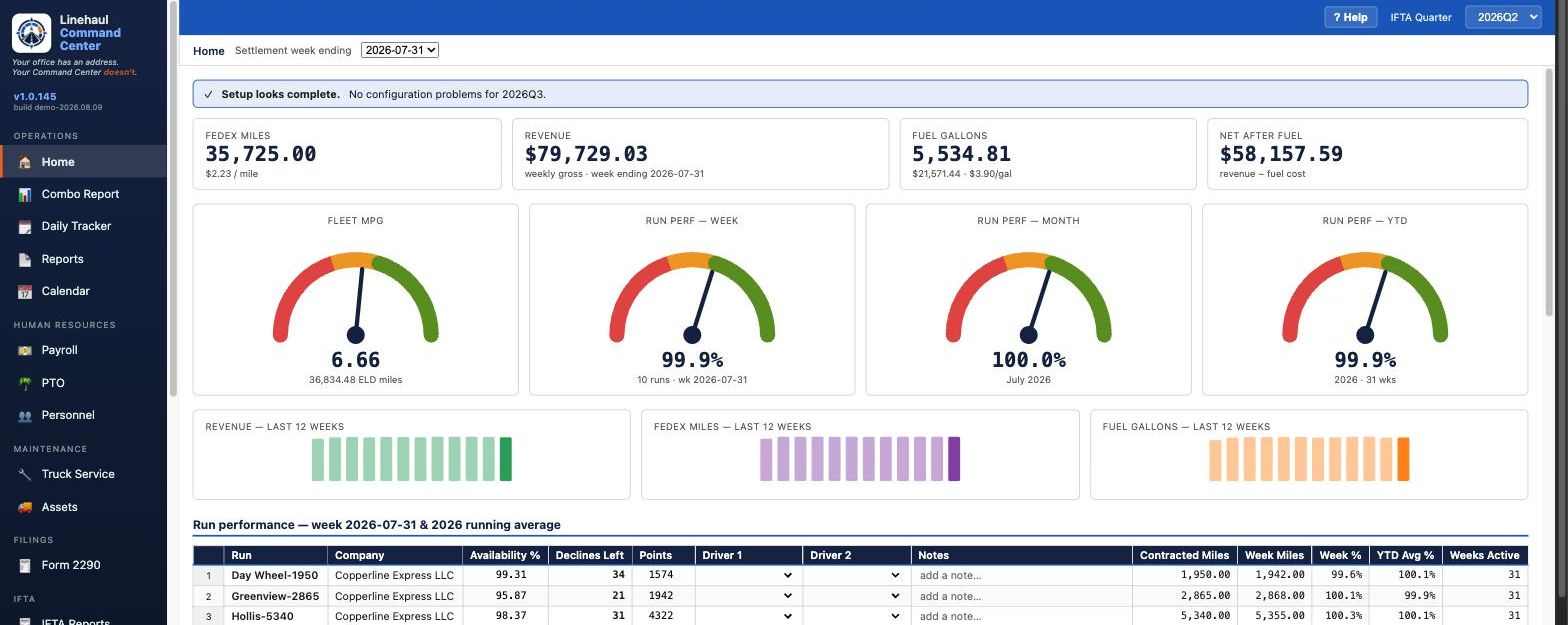
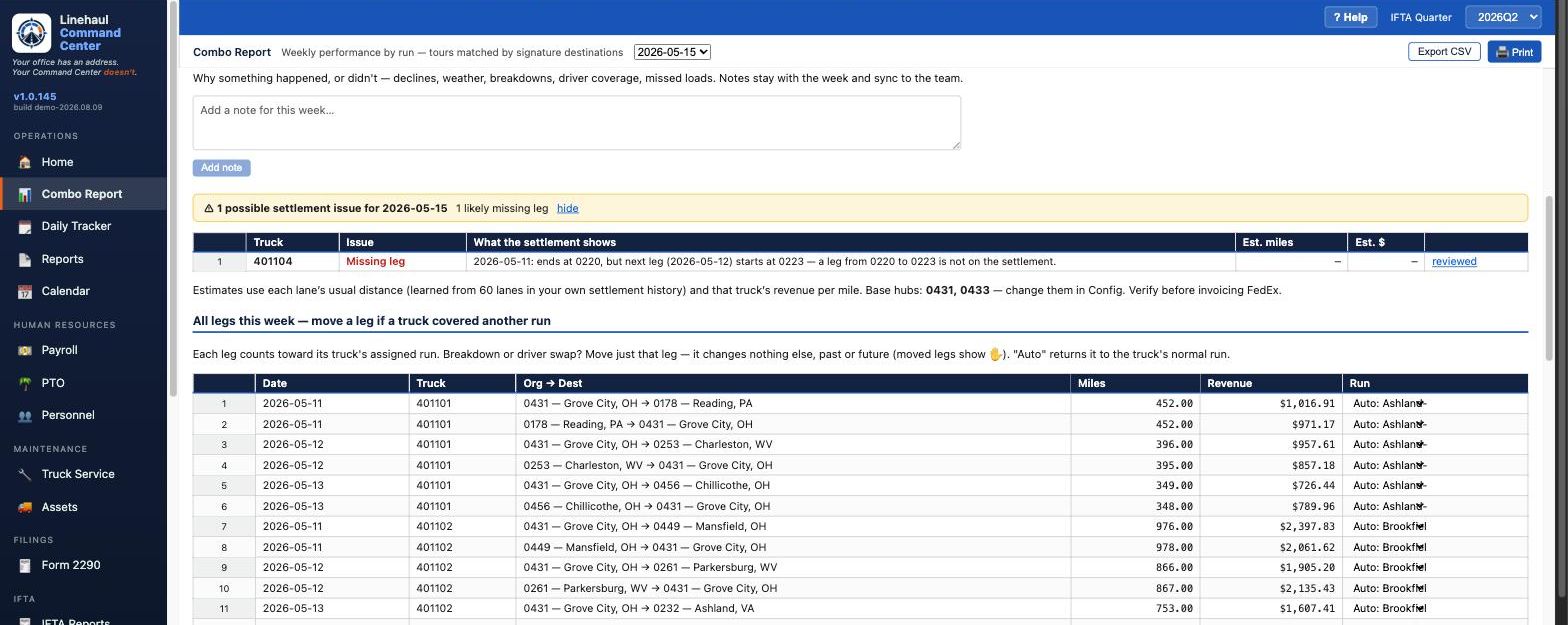
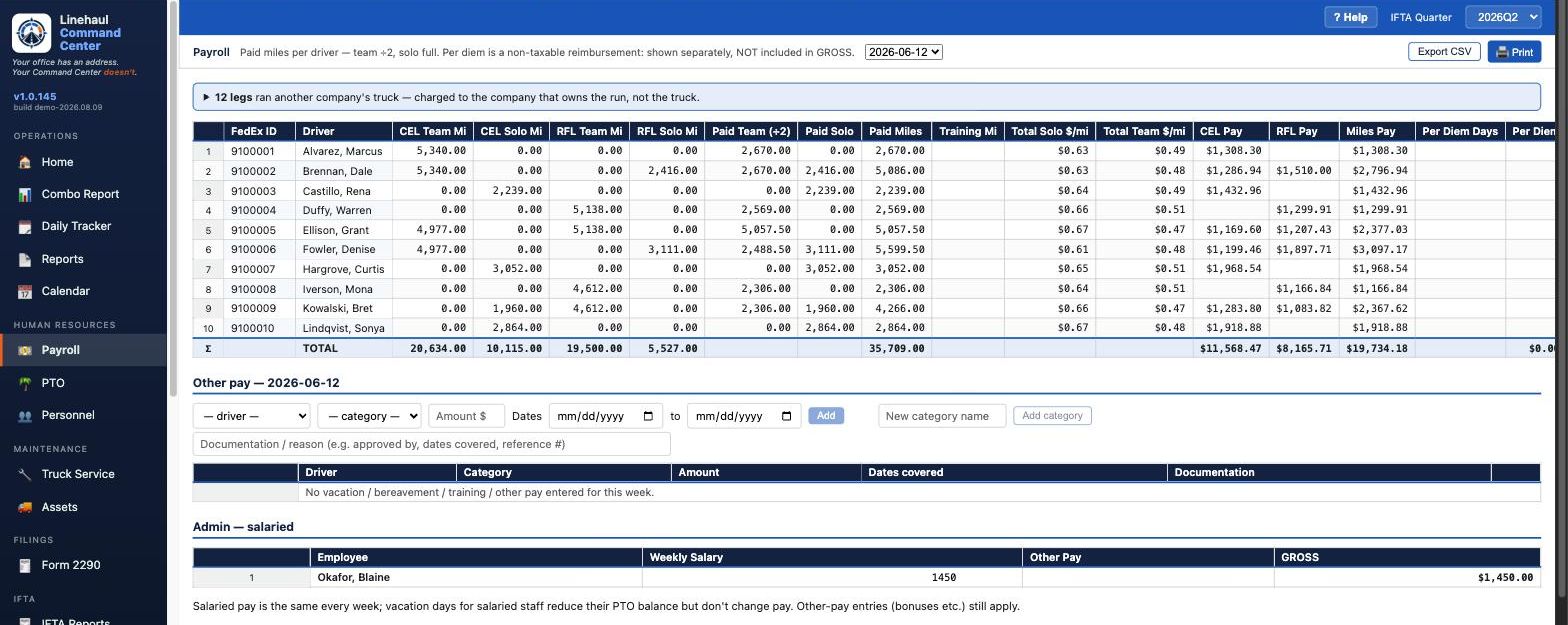
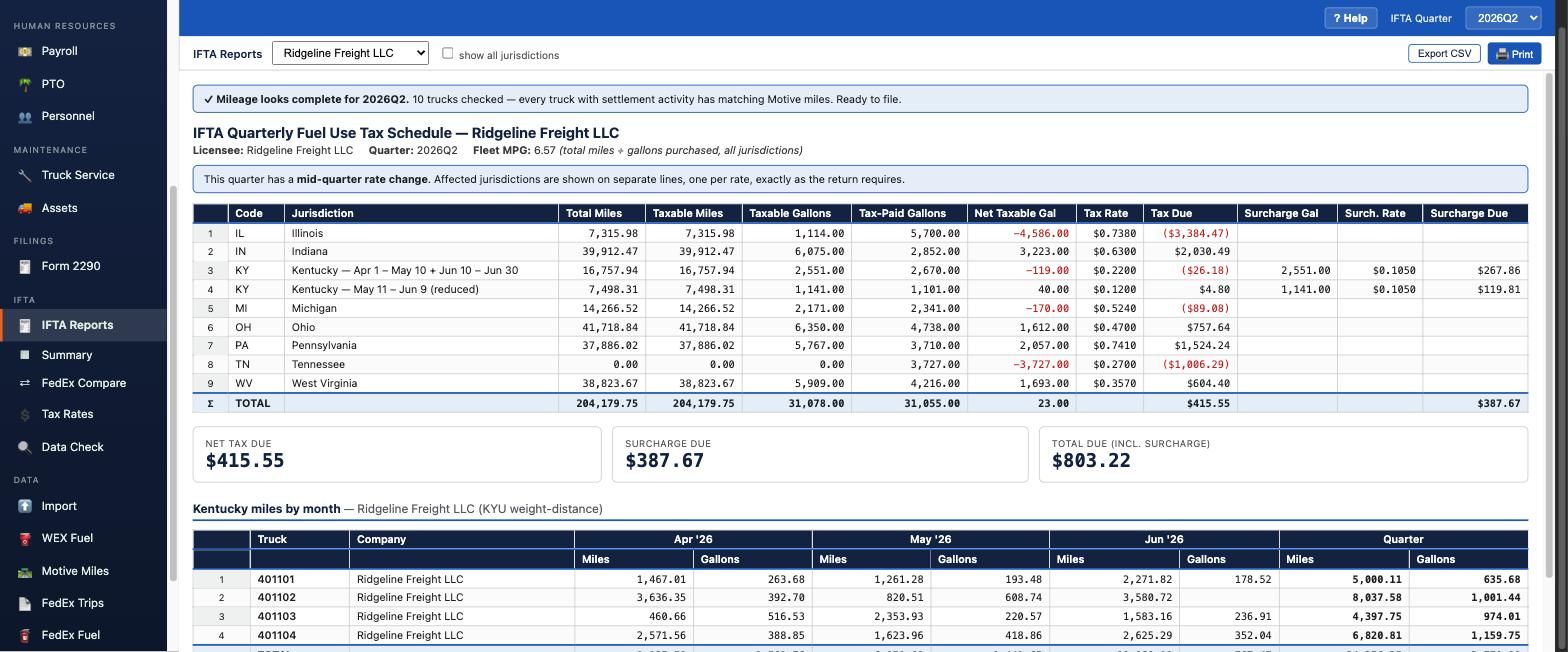
Every figure in these screens is invented. The demo below runs on the same sample data, so you can click through all of this yourself.
IFTA and 2290 assemble from data already in the system, rather than from a workbook you rebuild every three months.
Each quarter the system checks IFTACH and stages the new rates for you to review and approve.
Nothing changes a filing on its own — you see what moved before anything is applied.
Fuel imports, mileage records and settlements are compared against each other, so you find the discrepancy before the state does.
Generate a completed 2290 for each company from the trucks already in the system.
Linehaul Command Center prepares your figures and the supporting detail by jurisdiction. You review and file them.
CDLs and physicals turn red on the page as they approach expiry. No report to run, no reminder to remember to set.
Tracked weekly, with B service flagged inside 8,500 miles and DOT inspections flagged inside 30 days.
Retire a truck and it leaves the working tables while its full history stays intact for IFTA, 2290 and audits.
.ics importYou already have the data. FedEx already tells you what you ran and what they paid. Motive already tells you where the truck went. WEX already tells you what fuel you bought. Linehaul Command Center doesn't recreate any of that in a second dispatch board or another maintenance system — it reads what those sources already know and tells you what needs a decision.
| Settlement leg may be missing | ≈ $612 |
| New driver ID needs a name | 1 to review |
| Truck operated for another company | $1,284 to allocate |
| Everything else | Reconciled |
Not twelve dashboards. Not a map showing dots you already have in Motive. Not a second dispatch board recreating what FedEx already dispatched. Three things that need a decision — fix them and go home.
Not designed for a market segment. The missing-leg audit, the run-versus-truck attribution, the effective-dated pay rates — each exists because a contractor hit the problem and needed it solved that week.
Most contractors run multiple entities. LCC charges miles, revenue and pay to the right one instead of making you reconcile it afterward.
Historical payroll freezes. Retired trucks keep their miles. Terminated drivers keep their records. Nothing quietly disappears.
If FedEx, Motive or WEX already has the answer, Linehaul Command Center imports it instead of asking you to type it in twice. One less system to keep in sync by hand.
Import FedEx settlement statements, WEX fuel and Motive mileage. Historical years import too, so you start with a full picture rather than an empty system.
Built-in integrity checks compare your sources against each other and show you where they disagree.
Settlements, payroll, tracker and service all run off the same data. Enter something once.
IFTA and 2290 figures assemble from data already in the system.
No — it runs in your browser. Chrome, Safari, Edge, and Firefox are all supported.
Yes. Data syncs across your team and access is set page by page — your dispatcher doesn't need to see payroll, and your payroll clerk doesn't need to see IFTA.
No. Motive already tracks where your trucks go; WEX already records what fuel you bought. Import that alongside your FedEx settlements and Linehaul Command Center reconciles all three against each other — it doesn't ask you to re-enter what those systems already know, and it doesn't try to be a second ELD or a second maintenance platform.
No. It prepares the figures and the supporting detail by jurisdiction. You review and file. Linehaul Command Center is not a tax or legal advisor.
With white-glove setup, we migrate 12 months of data from your current spreadsheets — specifically the information that matches what Linehaul Command Center tracks. You start with a year of history already in place instead of an empty system.
Your spreadsheets themselves stay yours. Keep them on Google Drive or wherever you file things, for older history and future audits. You just won't be working out of them anymore — most contractors find they stop opening the majority of them, if not all.
Linehaul Command Center uses multiple layers of security designed to protect confidential employee and business information.
All information transmitted between Linehaul Command Center and its cloud infrastructure is encrypted using HTTPS/TLS.
Social Security numbers and CDL numbers receive an additional level of protection. These highly sensitive identifiers are segregated from general personnel records and stored in dedicated database tables using AES-256 field-level encryption. Encryption keys are separately protected through Supabase Vault and are not stored within ordinary application configuration or personnel records.
Direct application and user access to these protected tables is denied. SSNs and CDL numbers may be accessed only through purpose-built functions that verify the requesting user's administrative authorization before permitting the information to be stored, revealed, or removed. Access involving the disclosure of these values is recorded in an audit log identifying the authorized user and the time of the action.
Other personnel and operational information — including employee names, addresses, dates of birth, contact information, payroll records, settlements, vehicle information, and other business data — is protected by Supabase's platform-level encryption at rest, authenticated access, and Linehaul Command Center's role-based permission controls.
Access to Personnel and Payroll information is restricted by user permissions and is not granted by default to newly created team members. An administrator must affirmatively grant the appropriate level of access.
No electronic system can guarantee absolute security. Linehaul Command Center therefore uses a layered security model incorporating encryption, data segregation, restricted access, authorization controls, and audit logging designed to reduce the risk of unauthorized access to sensitive information.
$27.50 per run per month, with a $100/month minimum. A one-time setup fee applies: $250 standard, or $500 for white-glove setup, which includes migrating a year of your historical data in.
It's the real software on sample data — every screen above, plus the rest. Open the Combo Report, switch to the week ending 15 May, and watch the settlement audit find the leg that went missing. Then judge it against your own numbers.
Start with the Combo Report, week ending 2026-05-15 — that's the week with the missing leg. Questions, or want to walk through a week of your own numbers? Reply to me at support@linehaulcommand.com.